The Complex Perspective · 2016 Chapter 6 of 12 · ≈ 38 min read
The Raw Material: Data
Data, Information, and Knowledge
A Distinction
Private life has changed profoundly through new technologies: the internet, mobile phones, tablets, and apps. Knowledge can be looked up easily online; there is no longer any need to leaf through city maps, encyclopedias, or dictionaries. What once filled entire libraries now fits on a USB stick. Companies have also found many ways to use these technologies. Many have become information-processing “organisms.” Most employees in a company are no longer traditional manual workers, but knowledge workers. Most of the money in banks today “exists” only in a database on a computer. With many products, such as cars, a model used to have only a few equipment variants. Today, customers can assemble and configure a personal, almost unique car.
These changes are driven by the ability to process information with “computers” and transmit it through networks. With the internet, the information and knowledge age has outgrown its infancy.
But what exactly are data? What is information? And how do both differ from knowledge?
- Data
- Information
- Knowledge
- Belief
These terms are often used in everyday life without a clear sense of their precise meaning. For this book, it is important to distinguish and define them somewhat more carefully.
Data generally refers to facts, values, or formulas obtained, for example, through measurement or input. In data processing, data consists of characters or symbols. Data is stored on computers in files.
The content of data is called information. As explained in Section 5.3, there is a precise information theory. There is absolute information, which indicates how much storage space is required for the information. And there is relative information, which indicates the reduction of uncertainty (entropy).
Knowledge consists of information that people generally accept as true or valid. In the case of knowledge, one is fairly certain that it is true. Knowledge can be established either by proof or by experiment. If proof is still missing, it is a conjecture or a hypothesis. Belief, by contrast, expresses an assumption that has not yet been proven or cannot be proven at all. Christians, for example, say that they believe in a God precisely because no proof of God’s existence exists.
Important: Data is the container, information is the content, and knowledge is the totality of “true” information.
Data can contain information and useful knowledge. This information, however, has to be read out of the data or interpreted. A context is often required to interpret information fully. A message saying only “at 10:30 AM” contains too little information on its own. To understand it, one has to know the preceding messages, for example whether they concern a meeting at a particular place or a phone call.
For this reason, data analysis tries to find the knowledge contained in data. The established technique for this was statistics, although it could handle only smaller amounts of data. With computers, new methods in data mining and machine learning were developed that can process large amounts of data as well. Today, these techniques are grouped under the term Data Science.
Different Formats
There are different kinds of data. Data can be generated and processed by humans or by computers. The type is usually recognizable from the file extension: Vacation1.jpg is probably a vacation photo in JPEG format, and Party3.mp3 is probably party music in MP3 format. Here are a few more examples of data:
- Text data in natural language, such as English or Japanese: *.txt
- Program code in the Java programming language: *.java
- Data from applications and apps: word processing *.doc, spreadsheets *.xls
- Audio: *.mp3, *.flac
- Photos, images, drawings, scanned documents: *.webp, *.jpg
- Video / movies: *.mov, *.mkv
- Compressed data: *.zip, *.7z
There are countless others. Technically, each of these files consists of a sequence of bytes, that is, numbers from 0 to 255 stored in 8 bits. How this sequence of bytes is interpreted differs from app to app and has to be implemented by the app’s programmers. The same sequence of bytes means something different to a word processor than to an MP3 player. This is easy to see by opening an MP3 file with a word processor, although it is safer to make a copy of the file first.
Different Purposes
Data can be divided into the following groups based on its intended use:
- Application data
- Operational data
- Legally required data
Application data is created by the users themselves. Examples include documents for word processors, MP3 files, videos, etc.
Operational data is generated by the application or the computer system and consulted for error analysis and system monitoring by system administrators or developers.
- Logging data
- Database transactions
- Free memory space at a specific point in time
- CPU utilization at a specific point in time
System monitoring concerns the system, not the users. Some software systems are critical to the functioning of a company. For an online retailer, for example, the database containing products and orders must not fail. Monitoring checks many system parameters to see whether everything is in order. What is the operating temperature of the CPUs? How much space is left on the hard drives? Are the systems overloaded?
Legally required data must be stored due to legal requirements. The most famous requirements and regulations are the following [Cor11]:
- Sarbanes-Oxley Act for all companies traded on a stock exchange in the USA.
- Basel II and Basel III for banks in the EU.
- Environmental regulations of the EU and the World Trade Organization.
Basel III and Sarbanes-Oxley explicitly prescribe which data banks and companies have to provide, in which reports, and how often. These measures are intended to make the financial sector more secure against crises. When a regulation is introduced or changed, companies have to implement it and adapt their existing systems and workflows. For companies and organizations, data protection regulations determine exactly which data they must store, may store, may not store, and for how long. The requirements differ from country to country.
Different Types
Data can also be categorized by its format: Text data contains text in languages. These can be natural languages, such as English or Japanese, or formal languages, such as programming languages. Binary data refers to data that must first be decoded. Examples include audio files, photos, images, drawings, scanned documents, videos, and movies.
Text data can further be distinguished by whether a so-called “data model” lies behind it:
- Structured: the data is formatted according to a data model.
- Semi-structured: there is no explicit data model, but there is still a recognizable structure.
- Unstructured: no simple structure is recognizable, such as text in natural language.
Structured Data
Structured data depends on a data model. The standard example of structured data is the table. The data for the three “planets” from Section 2.3 could look like this in a table.
| Id | Color | Mass | Position | Velocity |
|---|---|---|---|---|
| 1 | blue | 3 | (2, 1) | (2, 0) |
| 2 | gray | 4 | (5, 3) | (0, 0) |
| 3 | red | 2 | (9, 4) | (-1, -1) |
The format of the data is defined by the data model, the so-called metadata. A data model specifies what the data should look like, which data must be present, which are optional, and what format the data must have (string or number). A data model therefore determines the permissible data records. The data model for the table above is:
- Color: String
- Mass: Integer (an integer is a positive or negative whole number 0, 1, 2, …, -1, -2, …)
- Position: 2D vector with integers in the format (Integer, Integer)
- Velocity: 2D vector with integers in the format (Integer, Integer)
Metadata is data about data. If someone unfamiliar with the table above received it without the metadata, they would not know exactly what format the data has or which values are correct or incorrect. Metadata defines the format of the data (syntax), not its meaning (semantics). Only a person with the appropriate expertise can decide what the data means.
CSV, JSON, and XML
The following three file formats have established themselves for storing tables: CSV, JSON, and XML.
CSV stands for comma-separated values. Unfortunately, commas are very often used inside data, as with the vectors in the table above. For that reason, a semicolon is often used as the separator: in other words, “semicolon-separated values,” as in the following example:
blue;3;(4,1);(2,0)
The individual values “blue”, “3”, “(4,1)”, and “(2,0)” are separated by semicolons. The advantage of this representation is its compactness and therefore its low storage requirement. However, the metadata is not supplied automatically, so CSV is only semi-structured.
The programming language JavaScript is frequently used in web browsers to make web pages dynamic, effectively “breathing life” into the pages. The JSON format (“JavaScript Object Notation”) is used for storage here, in which the example looks like this:
{
    "color": "blue",
    "mass": 3,
    "position": "(4,1)",
    "velocity": "(2,0)"
}
Here, each line contains the name of the attribute, a colon, and the attribute’s value. JSON has no automatic mechanism to ensure that the records actually contain all four attributes, “color”, “mass”, “position”, and “velocity”, or that these attributes have the correct values. For instance, nothing prevents “mass” from simply being given as “very large”, even though it is supposed to be a number. JSON is therefore also semi-structured.
In the XML data format, the data could look like this:
<circle>
    <color>blue</color>
    <mass>3</mass>
    <position>(2, 1)</position>
    <velocity>(2, 0)</velocity>
</circle>
Here, the values are specified between so-called tags. A tag has a start tag
Unstructured Data
With unstructured data, there is no data model that would make the data easy to recognize. Unstructured data can be divided further into two groups: repetitive and non-repetitive data [IL14]. Log messages from a program are an example of repetitive unstructured data. Here is an excerpt from Gephi starting up, from Section 2.3:
[INFO] Heap memory usage: initial 64,0MB maximum 455,5MB
[INFO] Non heap memory usage: initial 2,4MB maximum -1b
[INFO] Garbage collector: PS Scavenge (Collections=8 Total time spent=0s)
[INFO] Garbage collector: PS MarkSweep (Collections=2 Total time spent=0s)
[INFO] Classes: loaded=5729 total loaded=5729 unloaded 0
[INFO] INFO [org.netbeans.core.ui.warmup.DiagnosticTask]: Total memory 17.076.875.264
This is a mixture of structure, such as the INFO label and the colon in every line, and natural language.
The processing of texts in natural language has improved significantly in recent years. Natural Language Processing (NLP) is a subfield of Artificial Intelligence and is covered in Chapter 8.
Data in Practice
Application Data in Telecommunications
Mobile phone companies often offer different tariff options:
- Flat rate: everything included
- Limited quantity: e.g., 50 free SMS
- Limited duration: e.g., 2 free hours per month
- Restricted destinations: free calls to their own network, but others are subject to a fee
To prepare the bill at the end of the month, the mobile phone company has to record how the customer behaved. Telecommunications companies maintain a database for this purpose, in which every chargeable event by a user is recorded. Typically, at least the following data is stored in such a record, the so-called Call Detail Record (CDR):
- Source (A-party)
- Destination (B-party)
- Time of connection start in seconds
- Duration of the connection in seconds
- Cell ID
- Destination zone (for long-distance calls)
- International Mobile Equipment Identity (IMEI) of the source device
When subscriber A calls subscriber B, these data are recorded and stored in a database. Because of data protection requirements, these databases are of course subject to confidentiality and cannot be reached by hackers from the internet.
In a CSV file on the computer, the records then look something like this:
01790012345;040123456;121034;105;…
01790012345;0179123456;121402;30;…
01790012345;0300123456;165542;310;…
These data contain three phone calls. They are called connection data1. At the end of the month, these records are used to determine how many calls a user made and how long they lasted in total. Such a calculation is called aggregation. The data are also said to be “highly aggregated.” Aggregation can take place at different levels: per hour, per day, per week, per month, per year, and so on. This is called the aggregation level. The aggregated data are then used for billing. For that, however, there also has to be a database with the billing address and account information.
For criminal investigations, connection data are useful because they make it possible to determine all calls made by a suspect. For this reason, telecommunications companies were instructed to store these data “in reserve” in case the police or an intelligence service might need them. This data retention is justified as a measure for fighting terrorism and is highly controversial. Supporters say that data retention made an important contribution to solving the Madrid bombings of 2004; critics see it as “mass surveillance” [Shn15].
The problematic parts of these data are only those that can be used to identify the people involved: the A and B numbers or the mobile phone’s IMEI. These parts are therefore often encrypted.
The remaining data have immense value for the telecommunications company. They can be used, for example, to calculate the network load and optimize the network. Which mobile cells are used when, and how heavily? Which cells have to be improved and expanded? Which are redundant? These data are also useful for researching customer preferences. How often do customers make calls? Which services are used? Are there offers they do not use?
Troubleshooting with Logging Data
Computer systems run unattended. You cannot have a human supervisor for every computer. Humans are also not fast enough to keep up with a computer. A web server answers thousands of requests per second.
What happens if a system in a company does not behave as it should? If an error occurs, if it has a bug? Imagine a customer calls and says that half an hour ago your system did not behave as it should. You receive a “bug report.” Usually there are so many of these bugs that a separate computer system is used to manage and process them. Customer service enters the described error into this system and assigns a priority to the “ticket.” Some bugs are so important that developers should drop everything and deal with them immediately. Others, however, are less important, so a ticket may already be a few days old when a developer processes it.
Now the developer sees an error description like “On Wednesday, Oct 13, 2015 at 12:45 PM, Customer X wanted to change their data and the following error occurred…”.
What should be done? That was a long time ago. The developer needs a history in which they can look up what was happening at the specified time. For this reason, every computer system has a logging system that records important events [CSP12]. These logging messages are usually stored in files. Here is an example of such a file:
12:32:08.400 [DEBUG] [org.gradle.process.internal.DefaultExecHandle] Changing state to: STARTING
12:32:08.405 [DEBUG] [org.gradle.process.internal.DefaultExecHandle] Waiting until process started: command 'C:\Program Files\Java\jdk1.8.0_65\bin\java.exe'.
12:32:08.411 [DEBUG] [org.gradle.process.internal.DefaultExecHandle] Changing state to: STARTED
12:32:08.418 [INFO] [org.gradle.process.internal.DefaultExecHandle] Successfully started process 'command 'C:\Program Files\Java\jdk1.8.0_65\bin\java.exe''
12:32:08.418 [DEBUG] [org.gradle.process.internal.ExecHandleRunner] waiting until streams are handled...
Here the program records the exact time, down to milliseconds, and what it was doing then.
The developer who wants to find the cause of the error has to go through the log files, reconstruct the state of the system shortly before the error, and trace the system actions that led to the error. This is not always easy. Sometimes days of analysis and research are necessary, especially in complicated and extensive systems.
As a rule, no application data are stored in the log data. If someone changes their address in the database, the log says “Changed data record with ID 123.” The data themselves are not included. Otherwise, this would be a major security hole.
Logging is also used for security checks. Operating systems and networks, for example, log user sign-ins. So-called intrusion detection systems continuously analyze these log files and try to prevent possible hacker break-ins, or at least detect them as early as possible and trigger an alarm.
Logging data also show which features of a program are used and how often. Software manufacturers use these data to improve their programs.
Data on an Internet Platform
With an internet application, it is not always easy to determine exactly where the data are located. Usually, however, they reside with the application company on the web server or database server. The following figure shows a connection to a web page. User A wants to see the page index.html. The browser connects through the internet (shown as a cloud) to the company’s web server (the web server with a globe), shown by the gray arrows. The web server may fetch additional data from the database (the server with a “barrel,” because databases are often shown as barrels) and then sends the finished web page back to the browser, shown by the dashed arrows. The user’s browser then displays the page.
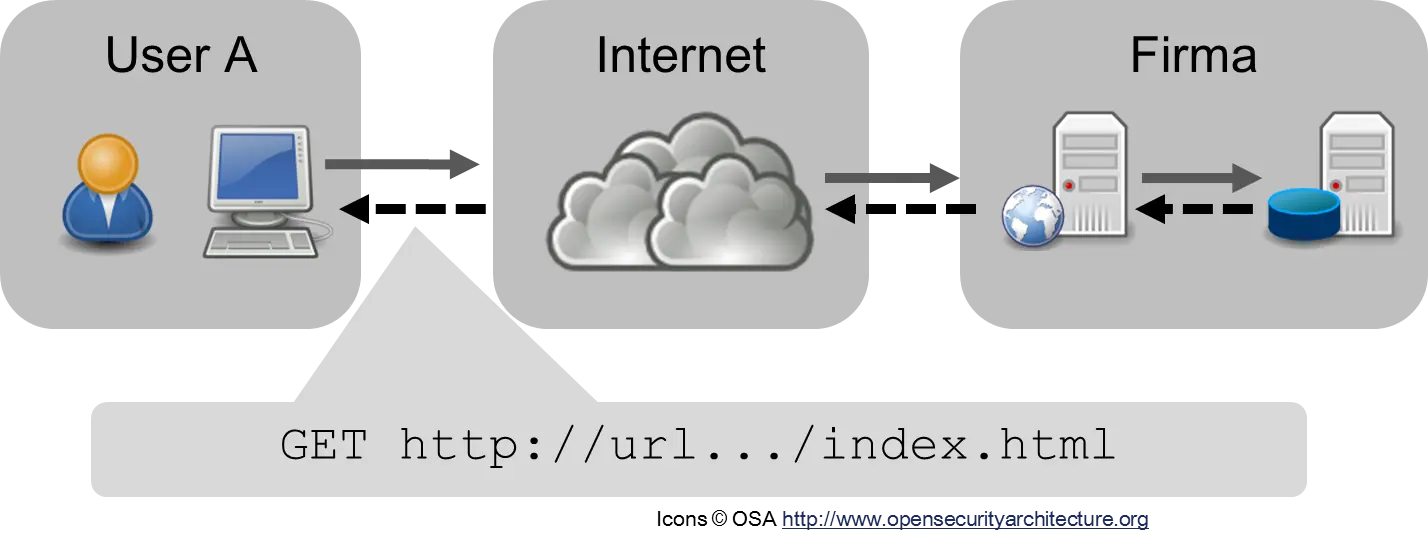
The data are on the company’s servers and are sent through the internet. While the data are traveling through the internet, they can be read by all “eavesdroppers” if they are not encrypted. For this reason, it is important to use an encrypted internet connection with HTTPS whenever possible.
But the actual data are on the company’s computers. Whether the data in the database and on the web server are secure then depends on the company’s security precautions. This has to be kept in mind in discussions about Facebook and Google. Critics have asked indignantly, “What are they doing with my data?” But the critic had stored “his” data on the computers of the social network. Were they still “his”? He had used the service’s infrastructure. Data that one does not want to share should not be uploaded to social networks. With cloud storage, by contrast, the situation is different: here the cloud storage provider has to ensure that the data remain secret.
Data in Companies
Today, work is organized through data and processes. In modern factories, every production step is recorded in a database. Information technology is an important foundation of companies. Companies are information-processing organisms. Typically, companies have the following areas [Dav14, Cor11]:
- Marketing
- Sales
- Manufacturing, Production
- Product Development
- Purchasing
- Finance
- Human Resources (HR)
- Management
Each of these areas needs different data, possibly in different formats. Finance, for example, may use a different definition for certain terms than Production. What is a “good customer,” for example? In large companies, it is important to standardize definitions and data and to introduce metadata management and master data management. These data contain uniform definitions that apply across the entire company.
The various areas of a company are subsystems of a complex system, because they interact with one another and form several networks [Por85]. The terms supply chain and value chain have become established for describing these complex relationships. Unfortunately, the term “chain” is not well chosen, because a chain suggests something linear. A better term would be supply web or supply network.
The supply chain describes the processes and data required to manufacture and deliver products. It leads from raw materials and suppliers through the entire company to the final customers. The “supply chain” is a scientific version of the network described in the story “I, Pencil” in Section 5.3.
Many companies model not only their product chains but also their service, finance, and information chains [Por85, Cor11]. In the value chain, costs are also taken into account. With the help of value chains, companies can be analyzed and their financial situation evaluated. Such value chains are a great help for optimizing processes.
For data processing in companies, different computer systems have traditionally developed:
- Supply Chain Management (SCM)
- Customer Relationship Management (CRM)
- Enterprise Resource Planning (ERP) for product development, production, and inventory
Supply Chain Management is used for computer-supported management of supply chains. Customer Relationship Management is modern customer administration and customer care. Enterprise Resource Planning (ERP) is used to “manage” the company’s resources, a kind of modern inventory.
Supply Chain
For a profit-oriented company, the use of a new technology has to pay off financially, that is, it has to bring in more than it costs to acquire. New technologies are therefore usually used first in cost-intensive industries, such as automobile manufacturing.
People have always tried to improve the production of goods. Today’s mass production began in 1904 with Henry Ford. Since then, techniques have been sought to optimize production, that is, to produce better goods with fewer resources and less labor. Research on improving a company’s “productivity,” however, was rather “ad hoc,” not systematic and methodical. That changed in the 1980s, when the “supply chain” was introduced. A real supply-chain boom followed. There was finally a conceptual tool for expressing processes in organizations [Por85, Cor11]. “Network thinking” was applied to companies. Supply-chain management is a way to optimize a company, make it more efficient, and reduce costs.
Today, supply chains are also exchanged between companies or mutually complement one another. An automobile manufacturer usually has many suppliers. By combining their own supply chain with those of their suppliers, many automobile manufacturers have managed to keep storage times as short as possible and receive new deliveries “on demand.” With so-called “demand-driven supply networks,” it is even possible today to “customize” products and offer them in many variants. Customers can assemble their own personal car because manufacturers have become more flexible by improving the supply chain.
Marketing as a Science
The marketing department has to answer the following questions, among others [Cor11].
- Customers: Who are the customers? What interests them? What products would they buy? What would they spend on them? What bothers them about the products they have purchased?
- Competitors: What is the competition doing? What products do they offer and at what price? What products are planned?
- Markets and their regulation: What is the general economic situation like? Are the products seen as environmentally harmful? What measures are necessary for environmental protection and recycling?
The department’s uncertainty (entropy) is high, so it needs information to reduce that uncertainty. For this it depends on high-quality data. Marketing has become a statistical science. Customer data can be taken from the CRM. Information about competitors, markets, or households is often purchased. Marketing examines the available data very closely in order to gain knowledge about the company’s market situation. The more information a company has in this area, the smaller its uncertainty and the greater the probability that it will make the right decisions and offer customers the right products.
Sales
The sales department has to perform the following tasks, among others [Cor11].
- Reporting: Creating reports on sales for management
- Sales Tracking: Number of sales, how well products are received in the market
- Trade Promotion: Advertising your own products, e.g., in supermarkets by setting up a special stand or through advertising campaigns
- Brand Value: Investigating the reputation of the products and the company
- Determining expenses for advertising and marketing
Here, the data for analysis are often even harder to obtain than in marketing because, for example, they arise on site in supermarkets, are not available in a database, and cannot be purchased. The data are also very diverse, occur in large quantities, and require the internet. Often the data are needed as close to the event as possible, so processing has to be as fast as possible. This is a typical use case for “Big Data,” which is described in Section 6.6. Much will still change here with Industry 4.0 and the Internet of Things. The Internet of Things is discussed later in Chapter 10.
Processes as Data: BPM
A process is a sequence over time. Processes can be documented by writing down what is happening at each point in time. The best-known example is probably the diary or blog. People write down every day what is going through their minds. Years later, this makes it possible to read how one was doing, what one was thinking about, what music one was listening to, and so on. A life has been recorded in data. It has a “memory.” In many industrial processes, it is also important to have a “memory,” because many production processes in industry are not monitored by humans, and processes on computers also run automatically.
But how can you describe these processes themselves? Or store them? How can you document the workflows in a factory and possibly improve them?
Process modeling tools and process modeling languages have become established for this purpose. One example is “Business Process Model and Notation” (BPMN). With this “language,” business processes can be represented and even executed automatically, provided workflow control is available. This leads to “programmable” factories. The following figure shows a simple example of a BPMN diagram2:
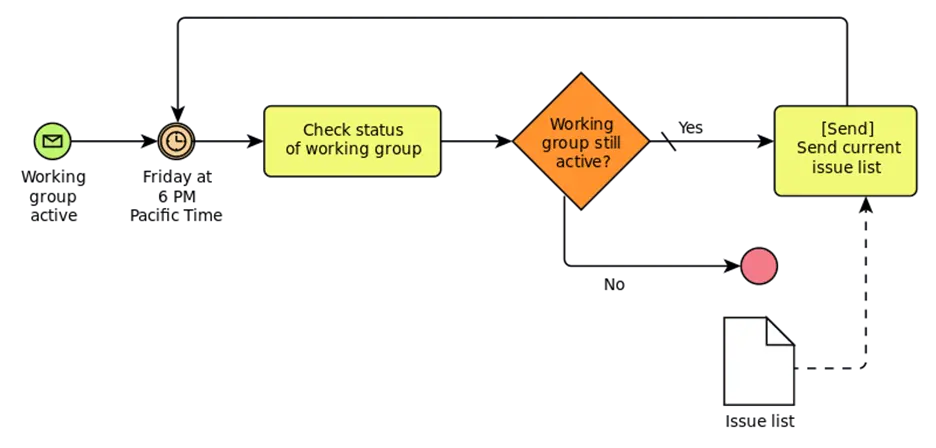
A BPMN diagram is a network, i.e., a graph. The nodes can have different types:
- Events: round circles
- Activities: yellow rectangles
- Gateway: diamonds
The edges also have different types:
- Sequence: solid line
- Message: dashed line
- Association (not present in the figure)
In the diagram above, an email is sent every Friday evening at 6 PM as long as the working group is active. In a company, of course, these diagrams can become very large and complex.
“Process orientation” means that a company thinks in such “processes.” Many companies have shifted over the last 15 years to a “process-oriented” view of the company. The management of these processes is called “Business Process Management” (BPM) [Dav14].
Important: Processes are data and processes process data.
Databases
Different Types of Databases
If data is to be kept permanently, it must be stored in a database or as a file. Over time, different types of databases have been developed [SF12]:
- Relational (RDBMS)
- Key-Value
- Document-oriented
- Graph-based
Each type has different advantages and disadvantages. Which one is used depends on the type of data, but also on the intended use and the system requirements. In an online store, for example, many people shop at the same time. Sales processing should be as fast as possible, so the order has to be stored quickly in the database. But if the marketing department of this online store wants, for example, to calculate the number of sneakers sold last month by postal-code area because a new sales strategy is being planned, this may take a few seconds and “rummage through” a large part of the database. That, in turn, could slow the database down, causing the sales mentioned above to take longer and preventing customers from shopping.
The type of database to use therefore has to be decided case by case.
Relational
Relational databases have been developed since the 1980s. They were the standard for many years. They store data in tabular form. Mathematical relation theory is used to define queries and operations precisely, hence the name. A table consists of rows and columns. A row is also called a record. Here, for example, is the table from Section 2.3 with the three “planets” 3:
| Id | Color | Mass | Position | Velocity |
|---|---|---|---|---|
| 1 | blue | 3 | (2, 1) | (2, 0) |
| 2 | gray | 4 | (5, 3) | (0, 0) |
| 3 | red | 2 | (9, 4) | (-1, -1) |
The “Structured Query Language” (SQL) was developed for interacting with the RDBMS [Dat13]. It includes queries that can be used to read data from a table. The following query determines the position and velocity of the gray circle.
SELECT position, velocity FROM circles WHERE color = 'gray';
There is also a command for changing data.
UPDATE circles SET position = position + velocity;
And for inserting new rows.
INSERT INTO circles VALUES (4, 'orange', 3, (0,0), (1, 1));
What happens with simultaneous changes by multiple users? What happens if two users want to change the same record? The so-called ACID principle was invented for this. The basis of this principle is the transaction. It guarantees that changes are carried out one after another and that the database remains in an “orderly” state.
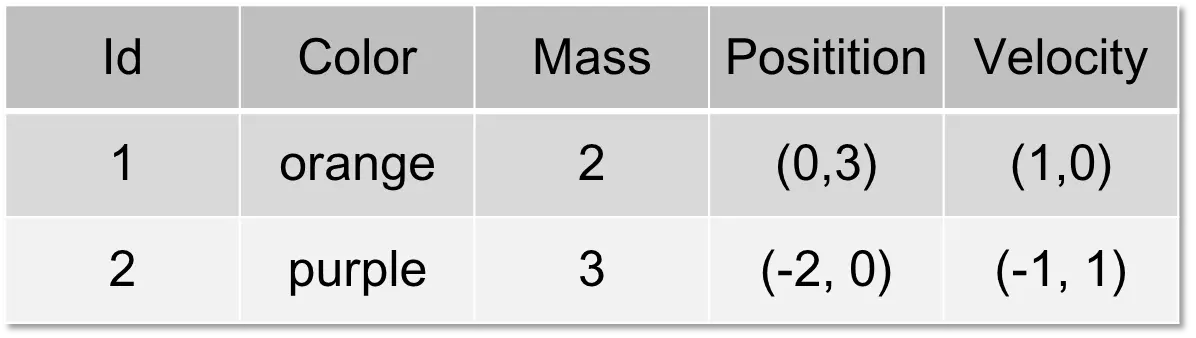
Not all data can be in one table or in one file. The following table has the same structure as the previous one, but different records. These two tables can simply be appended to one another (“append,” “concatenated”).
To combine data with different structures, at least one column is needed that can be used to connect the records. Let the following table be called “rgbs”.
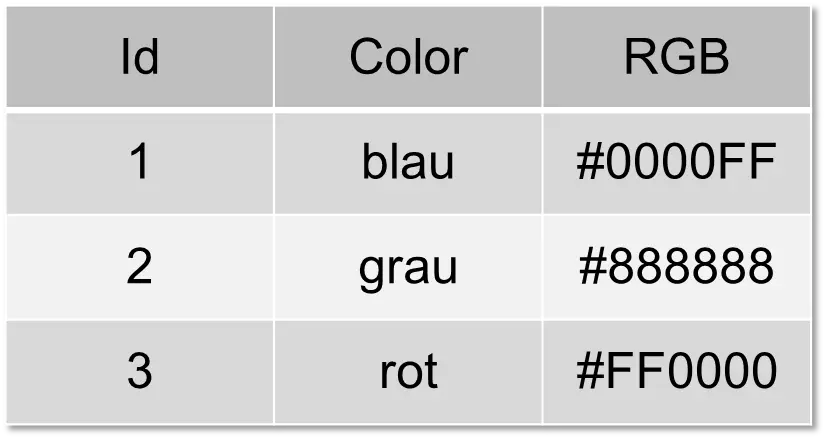
The first table can then be connected to this one using the “Color” column. This connection is called a “join”.
SELECT circles.color, circles.mass, b.rgb FROM circles, rgbs WHERE circles.color = rgbs.color;
The result is the following table:
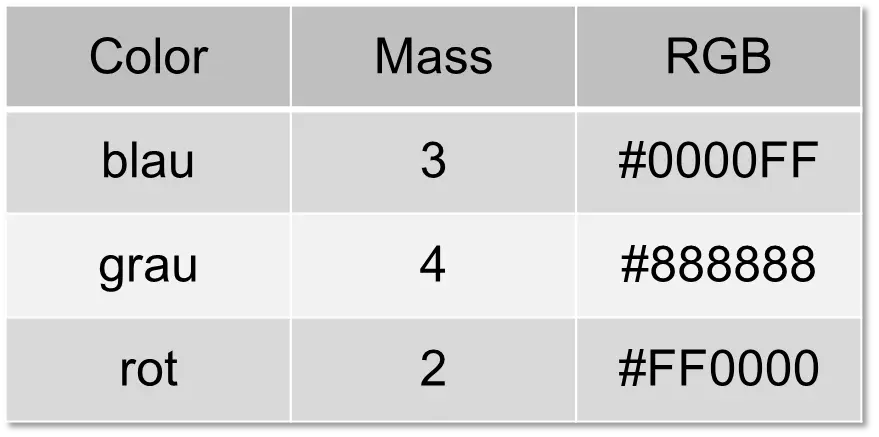
With a “join,” you can therefore combine several tables.
To store data in a relational database, everything has to be arranged in tables that can possibly be “joined” with one another. Relational databases work best when the data are in a so-called normal form [SF12, Dat13]. This is not always practical for the database user, because graphs and networks, for example, cannot always be squeezed easily into tables. For the database developer, however, it was simple, because a relational database is easy to implement.
With today’s large amounts of data, databases can no longer be run on a single computer; instead, one wants to use a distributed system. A distributed system consists of several computers that together form a single system. This distribution, however, is incompatible with the ACID principle. The ACID principle guarantees that simultaneous transactions by different users always proceed properly, that is, that they are “consistent.” Once multiple computers are involved as well, this is no longer possible. A database cannot be consistent, highly available, and distributed at the same time. This insight is called the CAP theorem [SF12, CM16].
These limitations have led to the development of other types of databases, which are often also referred to as NoSQL databases.
Key-Value
For some application areas, tables are far too complicated. All that is needed is a kind of notepad on which a few values can be written quickly. Key-value databases meet this requirement. A key-value store essentially has only a PUT method for writing new data and a GET method for reading data. In the following sample session, the data for one of the three “planets” are written.
C:\>bin\voldemort-shell.bat test tcp://localhost:6789
Established connection to test via tcp://localhost:6789
> put "u:color" "blue"
> put "u:mass" "3"
> put "u:position" "(2, 1)"
> put "u:velocity" "(2,0)"
> get "u:color"
version(0:1) ts:1447771236296: "blue"
>
First the data are written with “put”; then the color is retrieved with “get.” This is very simple and rudimentary, but the processing speed is much higher than with a relational database. The example uses Project Voldemort4.
Document-oriented
For other applications, by contrast, tables are too simple. This applies especially to data that are “nested” inside one another. Much data already exists in JSON and XML format. It would be practical to store these documents directly without converting them into tabular form. In Section 6.2, we already saw a simple example in JSON. In reality, however, JSON documents are “nested”: an attribute can itself contain a complex JSON document as an element. Trying to “squeeze” these data into tables would be counterproductive.
We cheated a little with the JSON data, because we stored the position and velocity as the strings “(4,1)” and “(2,0)”. The computer thinks this is text and does not know that it is a vector.
{"color":"blue","mass":3,"position":"(4,1)","velocity":"(2,0)"}
We can change that by inserting a “subdocument” with curly braces:
{
    "color": "blue",
    "mass": 3,
    "position": { "x": 4, "y": 1 },
    "velocity": { "x": 2, "y": 9 }
}
After “position” comes a “subdocument,” which in turn contains the attributes “x” and “y.”
As the database, we use Apache CouchDB5. The low-level API is HTTP, and a circle is inserted from the command line as follows:
curl -H 'Content-type: application/json' -X POST http://127.0.0.1:5984/model -d '{ "color": "blue", "mass": 3, "position": { "x": 2, "y": 1 }, "velocity": { "x": 2, "y": 0 } }'
This looks more complicated than it is: -H specifies the document content, in this case “application/json”; -X says that the message should be stored, “POST”; and the document itself is specified with -d. But there is also a web interface. CouchDB is queried using the MapReduce framework. The following screenshot shows the result of an example query.
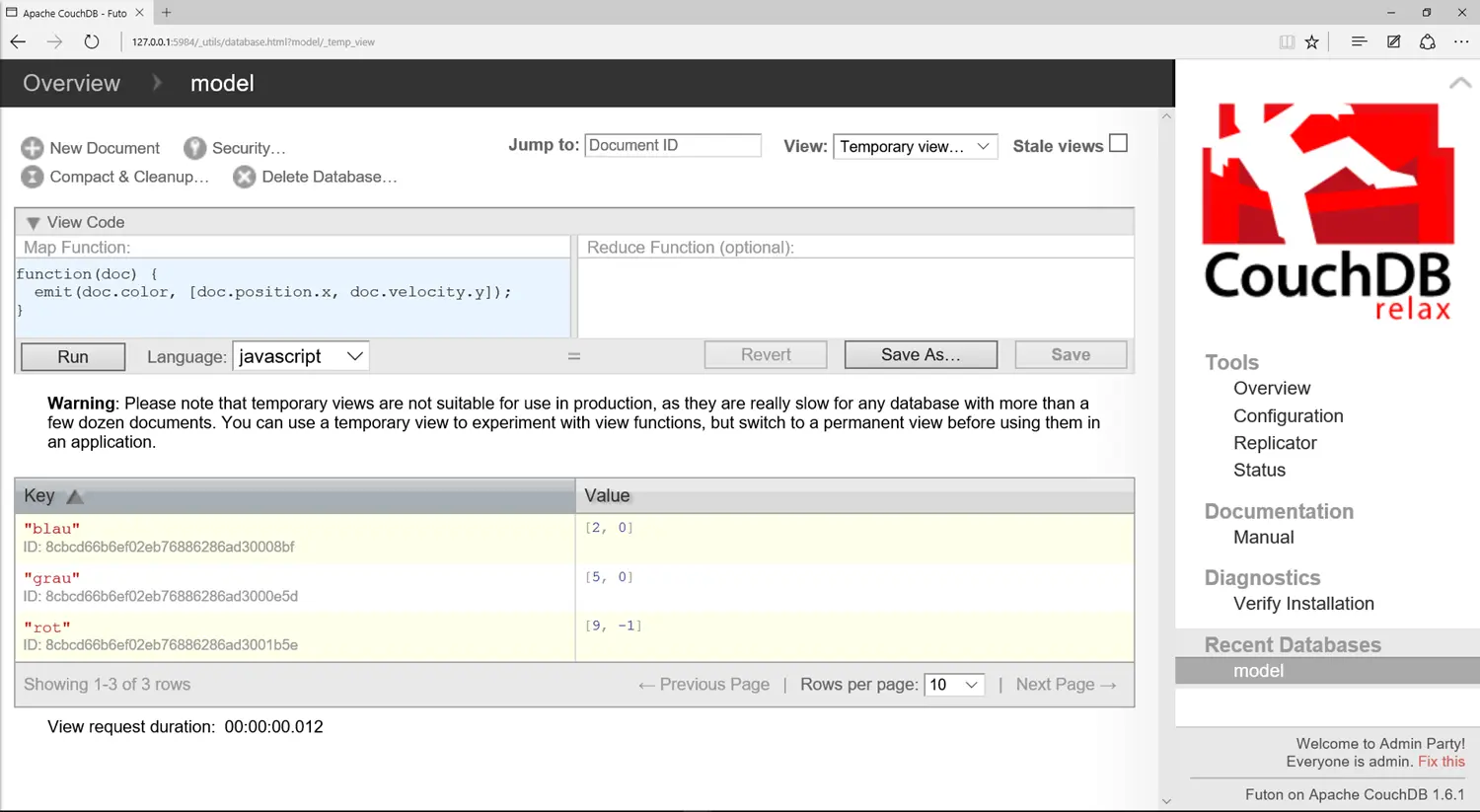
The query function is specified in JavaScript in the upper-left window. Below, in the yellow-highlighted windows, the three spheres can be seen in the response. The x and y coordinates of the nested elements can therefore be accessed directly with “doc.position.x” or “doc.velocity.y.”
Graph-based
Graphs are also hard to process with relational databases. One would need a table for the nodes and a table for the edges. That requires a large number of joins. For this reason, graph databases have been developed in recent years. They place higher demands on computing power and memory, and therefore require newer computers, but they are much easier to program.
We use the graph database Neo4J6, which has a “Community Edition” that anyone can use. As an example, we use the social network from Section 2.3, which contains the people Anton, Berta, Charlie, and Dennis and the cities Berlin and Cologne. Neo4J’s language is called Cypher, and the graph can be created with the following statement.
CREATE
    (A:Person {name: 'Anton'}),
    (B:Person {name: 'Berta'}),
    (C:Person {name: 'Charlie'}),
    (D:Person {name: 'Dennis'}),
    (K:City {name: 'Cologne'}),
    (Be:City {name: 'Berlin'}),
    (A)-[:KNOWS]->(B),
    (A)-[:KNOWS]->(C),
    (B)-[:KNOWS]->(A),
    (B)-[:KNOWS]->(C),
    (B)-[:KNOWS]->(D),
    (C)-[:KNOWS]->(A),
    (C)-[:KNOWS]->(B),
    (D)-[:KNOWS]->(B),
    (A)-[:LIVES_IN]->(K)-[:LIVES_IN]->(A),
    (C)-[:LIVES_IN]->(K)-[:LIVES_IN]->(C),
    (B)-[:LIVES_IN]->(Be)-[:LIVES_IN]->(B)
The first lines create the nodes. The nodes have two different types: Person and City. The nodes are then connected with edges according to the pattern (source)-[edge type]->(target).
Neo4J also has a web interface that can automatically draw the graph.
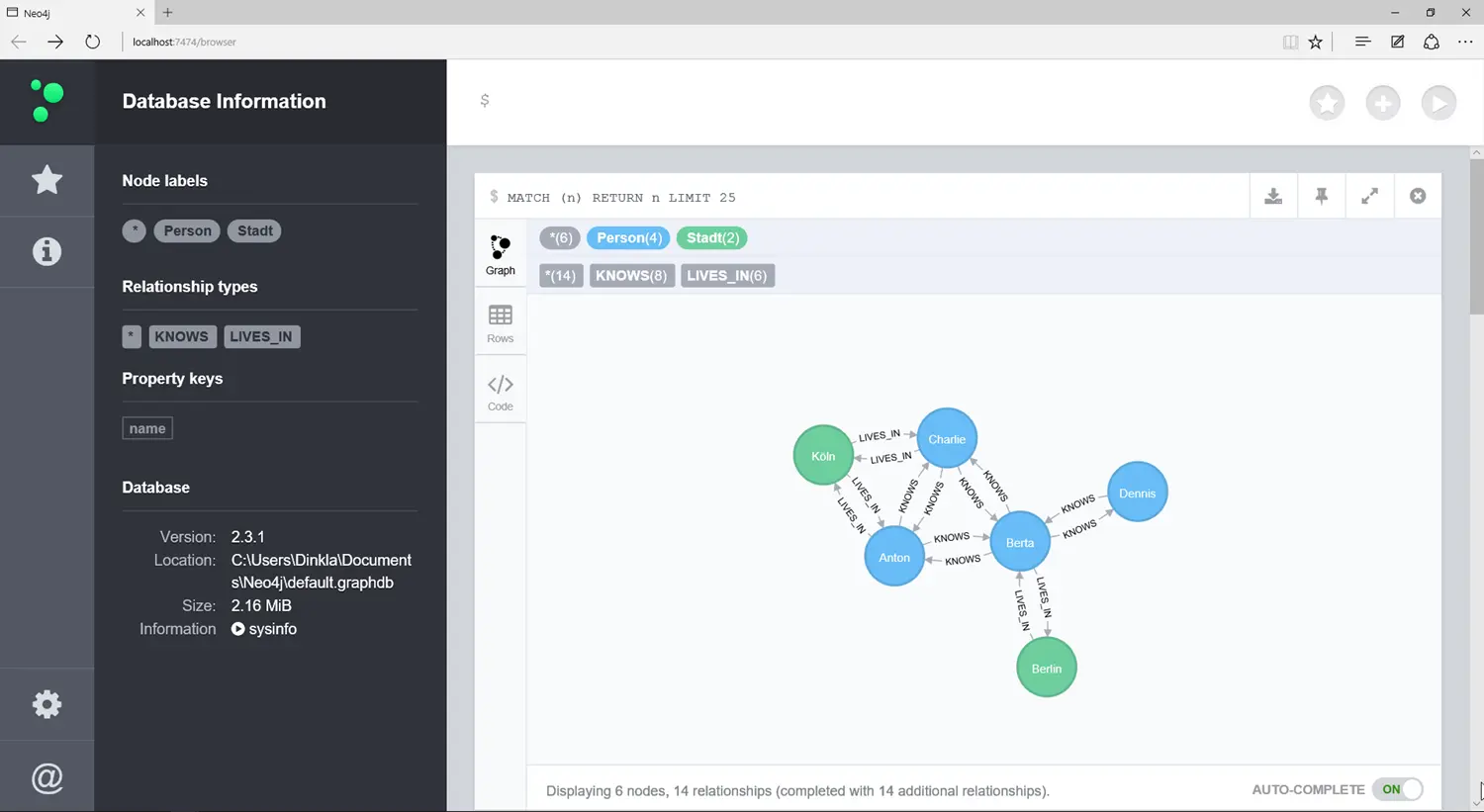
Queries work somewhat differently than in SQL. Here one has to learn a new query language. The query used …
MATCH (n) RETURN n LIMIT 25
… simply returns the first 25 nodes and their edges. You can also search based on an attribute like the name.
MATCH (p:Person) WHERE p.name = 'Berta' RETURN p
This query only returns the single node for Berta.
The following query returns all people Anton knows, namely Berta and Charlie:
MATCH (p:Person)-[:KNOWS]->(q) WHERE p.name = 'Anton' RETURN q
You can also ask more complicated queries, such as “Who knows someone in Cologne?”
MATCH (k:City { name: "Cologne"}), p-[:KNOWS]->(q)-[:LIVES_IN]->(k) RETURN p,q
Readers who would like to study graph databases further are referred to the book “Graph Databases” by Ian Robinson et al. [RWE15].
The Data Warehouse
Section 6.2 explained that companies have different systems for different departments: CRM, SCM, ERP. For a company, however, it is important to have a central point where all important data are stored in a uniform way:
- Data must be consistent: same names, taxonomies, and definitions.
- One source of truth: if there are several databases and values differ, the company has a problem.
For companies, it is therefore important to have a database containing all data that are important for the company. This database is called a Data Warehouse (DWH). The Data Warehouse is the central organ of a company. It contains information about the state of the company from all business areas. To do this, the data from the individual systems, CRM, ERP, and so on, have to be imported into the DWH. The following figure shows a simplified version of the process for loading the Data Warehouse (DWH):
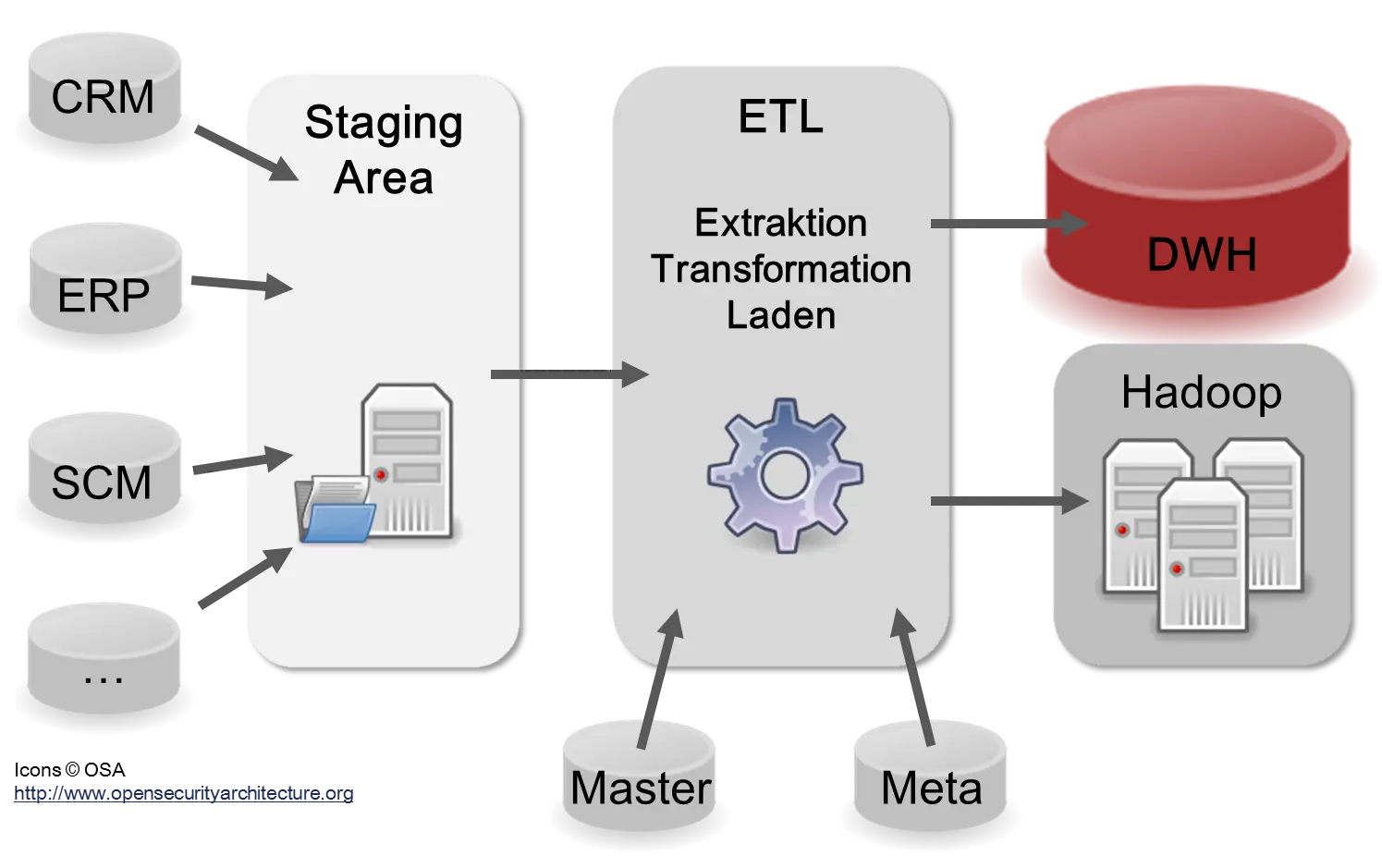
In reality, there are usually many more than the three systems shown in the diagram: CRM, ERP, and SCM. In large companies, there are hundreds or thousands. The reason is the many different applications, web services, and microservices used in a company. Most of these services have their own data format and follow different standards. In a Data Warehouse, data are usually stored in a relational database or in a distributed file system with Hadoop. The advantage of Hadoop is that it can also store semi-structured and unstructured data [Dav14].
Company-wide master data are important for consistent reporting. All definitions and taxonomies used in the company are maintained there. The metadata define the format, data type, and content of the data, that is, of the tables and files. Sometimes the ETL processes themselves are also stored as metadata. This is important for analyzing the origin (“provenance,” “lineage”) of the data. If faulty data are discovered in the DWH, it is important to be able to trace the error back to the source systems so that it can be fixed there. Since information is an important asset in a company, it is also important to understand the quality and trustworthiness of the data. A large part of the work on a DWH consists of aligning the data and ensuring quality. There is a saying for this: “Garbage in, garbage out” [IL14, CM16].
The following steps have to be considered in the ETL process [IL14, Ols02]:
- Data integration: remove inconsistencies, input errors, incorrect values, and missing values.
- Data maintenance: standardize taxonomies and user inputs.
- Aggregation: aggregate data to the day, month, quarter, or year level.
- Enrichment: for example, with purchased data.
- Compression: remove columns or reduce values (“binning”).
- Update the metadata.
Business Intelligence
The DWH is the basis for all information in the company. Data analysis is very important for companies, so important that some companies now have a Chief Analytics Officer (CAO) responsible for data analysis [Dav14, IL14]. It has to be kept in mind that every department has a different view of the data and interprets them differently. The finance department of a telecommunications company will have a different view of the technical infrastructure because it is interested only in costs. The technical department, by contrast, is interested in details such as which technical standards the devices implement. For this reason, there are so-called “Data Marts” specific to each department. The following figure shows two data marts for Sales and Marketing as examples.
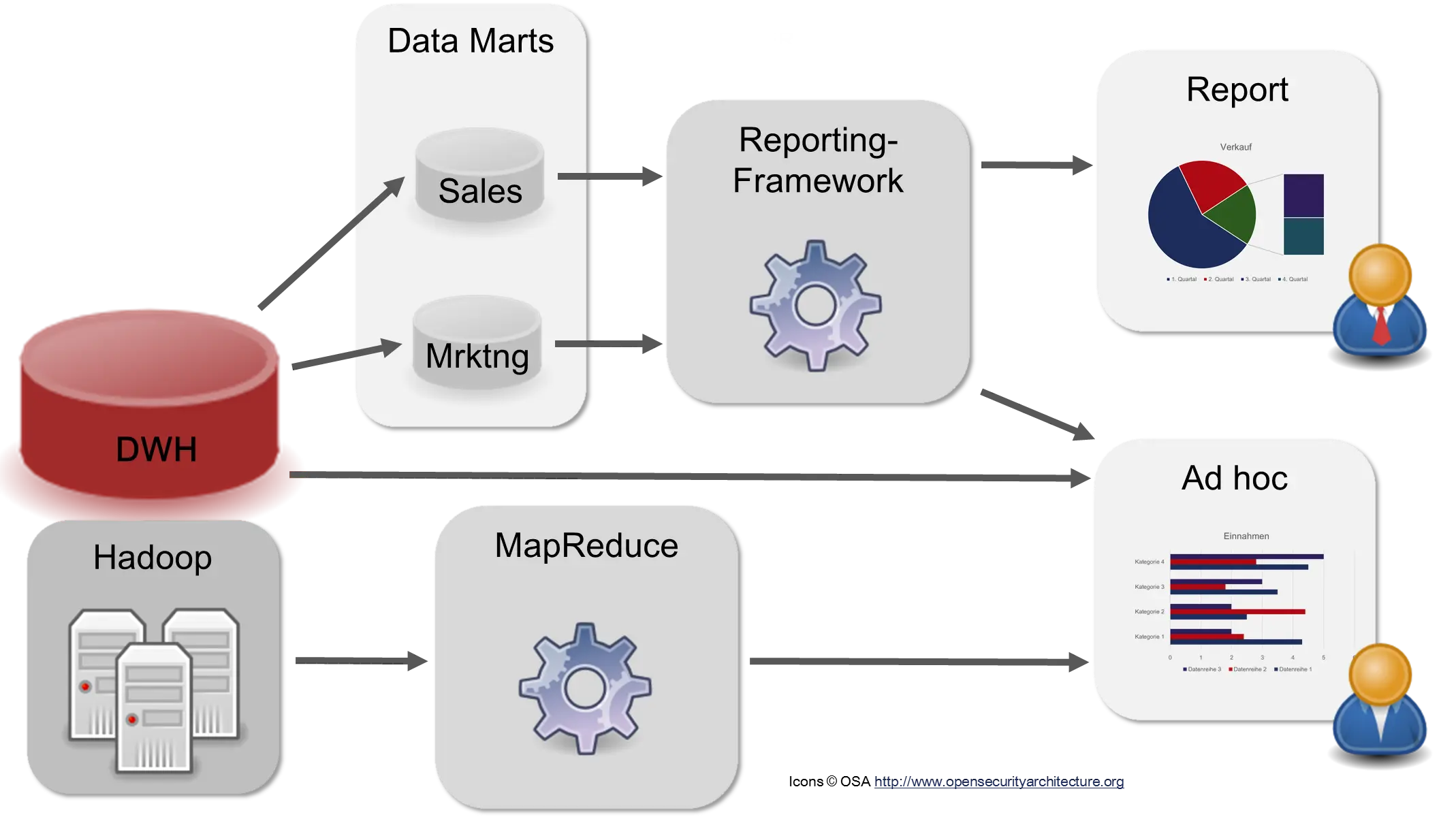
The DWH, the Data Marts, and often Hadoop serve as the basis for the “consumers” of the DWH. There are different types of users. Management wants to be informed about the company’s status. There are usually prepared reports with Key Performance Indicators (KPIs) that only have to be retrieved or that are automatically generated and sent by email at certain times. Product developers and data scientists, by contrast, search the data for new insights or for ways to create new reports.
The tasks are thus (greatly simplified) summarized:
- Reporting and record-keeping
- Data analysis: Ad hoc queries, dashboards
- Data Science, Data Mining
- Data exploration: Exploring the data—what is actually there? What could be done?
- Data visualization
As one can see, the “Intelligence” in “Business Intelligence” should not necessarily be translated by the German word for “cleverness,” but rather as “information gathering,” as in the American “Central Intelligence Agency” (CIA).
Big Data
As with many technical developments, demands rise with progress. Companies used to be satisfied if they had current data once a week; then it had to be daily, then hourly, and today preferably in real time. A large part of the data generated in industry was also not analyzed because it was unstructured or only semi-structured [Dav14]. Many companies, however, want these data in the DWH. Expectations have risen, and the existing Data Warehouse architecture has to be adapted to the new requirements. This new technique is called “Big Data.”
What turns a traditional DWH system into a Big Data system?
Opinions differ here, but as a rule there is agreement on the 3 V’s [Dav14, CM16, Kri13]:
- Volume: The amount of data must be so large that it can no longer be processed on a single computer.
- Variety: The data must have different formats, i.e., be semi-structured or unstructured.
- Velocity: Immediate processing is desirable.
These new “V” requirements, however, usually require changes to the structure of the DWH, the ETL processes, and the operations.
The first requirement, “Volume,” led to the use of distributed systems. The data became too large to process on a single server, so the data and the calculations had to be distributed across several servers.
The second requirement, “Variety,” can mean a high workload and thus high costs. Semi-structured data can be very difficult to analyze. Audio data have to be converted into text. Automated video recognition is not yet sufficiently developed. Texts in natural language require NLP processing. At the present time, the last two techniques are often still research topics and not yet always automatable. Proper integration into an existing DWH also requires data cleaning, adjustments to master data, and so on.
The third “V,” “Velocity,” is intended to ensure that data can be analyzed as quickly as possible. For this, however, the existing DWH sometimes has to be expanded, for example by introducing a “Speed Layer” in the so-called Lambda architecture [MW15]. Continuous processing of the data is now required.
Big Data is therefore a technique for processing more data and unstructured data at a higher speed than before. That sounds simple on the one hand, but it is technically quite complicated.
There are many books that warn of the dangers of Big Data. So where is the danger? Big Data itself is just as harmless as a database itself. The possible dangers lie in who uses this technology and for what purpose.
-
In the media, the connection data in the context of the NSA affair around Edward Snowden were often called “metadata”, which is actually not correct. ↩
-
See https://en.wikipedia.org/wiki/File:BPMN-AProcesswithNormalFlow.svg ↩
-
This representation is a bit simplified, because the vectors (2,1), (2, 0) do not exist directly in SQL like this. ↩
